

Scrubs.
A HIPAA MESSAGING APP
THE CHALLENGE: Create a new concept app to improve communication between healthcare staff members.
THE SOLUTION: A H IPAA Compliant messaging app catering to hospital care workers.
ROLE: UX Researcher. UX Designer. UI Designer.
TOOLS: Figma, Photoshop, and Google Workspace
DURATION: 2 Weeks.


[ THE PROBLEM ]


Having worked in Healthcare I knew there was a problem with communication in hospitals between Healthcare Workers that I wanted to help solve.
[ THE PROCESS ]
For this case study I applied my experience to the double diamond design method for clarity.

[ DISCOVER ]
[GENERAL RESEARCH]
Empathy comes first!
I started by doing some general research.

67%
NURSES
REPORT MEDICAL DISAGREEMENTS WEREN'T RESOLVED APPROPRIATLEY.
250,000
PATIENTS IN THE USA DIE AS A RESULT OF MEDICAL ERRORS EVERY YEAR

60%
MEDICAL ERRORS
ARE CAUSED BY COMMUNICATION FAILURE BETWEEN DOCTORS AND NURSES
[MARKET ANALYSIS]
To help guide me through the design process. I wanted to take some time to look at the current business market.

$1.1 BILLION
THE US GOVERNMENT SPENT $1.1 BILLION DOLLARS ON HOSPITAL CARE.
33% SPENT
HOSPITALS TAKE UP 33% OF TOTAL HEALTH CARE SPENDING IN THE USA
$43 BILLION
MEDICAL DEVICE INDUSTRY IS WORTH $43 BILLION DOLLARS .
[COMPETITOR ANALYSIS]
To understand what already exist in the market I took a look at some competitors.


[ PRO ] : A lot of useful features
[ CON ] : Lacks consistency and is overwhelming .

.png)
[ PRO ] : Organization of messaging and ease of use.
[ CON ] : Not industry specific


[ PRO ] : Medical Device integration
[ CON ] : More focused on communication between Health Provider and Patient
[1:1 USER RESEARCH]
I developed a research interview plan and got great insights.
Users were all current hospital care providers.


[RESEARCH RECAP]
5 things that called to my attention out the most during my research was:

ASSIGNMENTS
LACK OF ASSIGNMENT TRANSPARENCY AMONG NURSING STAFF

MEDICAL ERRORS
POOR COMMUNICATION BETWEEN STAFF CAN CAUSE MEDICAL ERRORS

EXPENSIVE
MONEY SPENT IN HEALTHCARE, HOSPITALS TAKE UP THE MOST OF THAT SPENDING.

WORK OVERLOAD
STAFF IS CONSTANTLY OVERLOADED AND NEED WAYS TO HELP.

HARD TO
REACH
HARD TO REACH PROPER STAFF IN THE EVENT OF AN EMERGENCY
[ DEFINE ]
[USER INSIGHTS ]
To Synthesize the research gathered I developed: User Insight Board, Affinity Diagram , User Persona, & Empathy Map.


[PROBLEM STATEMENT]
"How might we create a Communication App for Healtcare Staff that will help make communicating and collaborating easier and more efficient?"

[ DEVELOP ]
[IDEATION]
My team and I brainstormed a list of features for the app, we used a 3 dot voting system to narrow down what to include. We chose the top features by mapping it onto a priority matrix.


[BRAINSTORMING]
Now that I knew where I was headed I started to think about all thing things I learned. I also thought of the inspiration I gathered for this project to come up with a solution for my users.


[WIREFRAME SKETCHES]
I sketched out my initial ideas.


[LO-FI PROTOTYPE]
Then converted my sketches into a lo-fi prototype so I could begin usabilty testing.


[ USABILITY TESTING ]
I tested the Lo-Fi prototype with 5 users and identified some areas for improvement.
[NAVIGATION]
[ PROBLEM ]
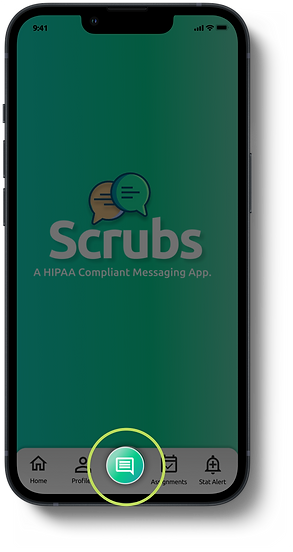
Users found the plus sign too confusing and didn't know what it was for.

[ SOLUTION ]
I changed the plus sign to a messaging icon and it became more clear to users that it was for starting a new message.
[ASSIGNMENTS]
[ PROBLEM ]
Users were having difficulties locating the assignments in the profile section.

[ SOLUTION ]
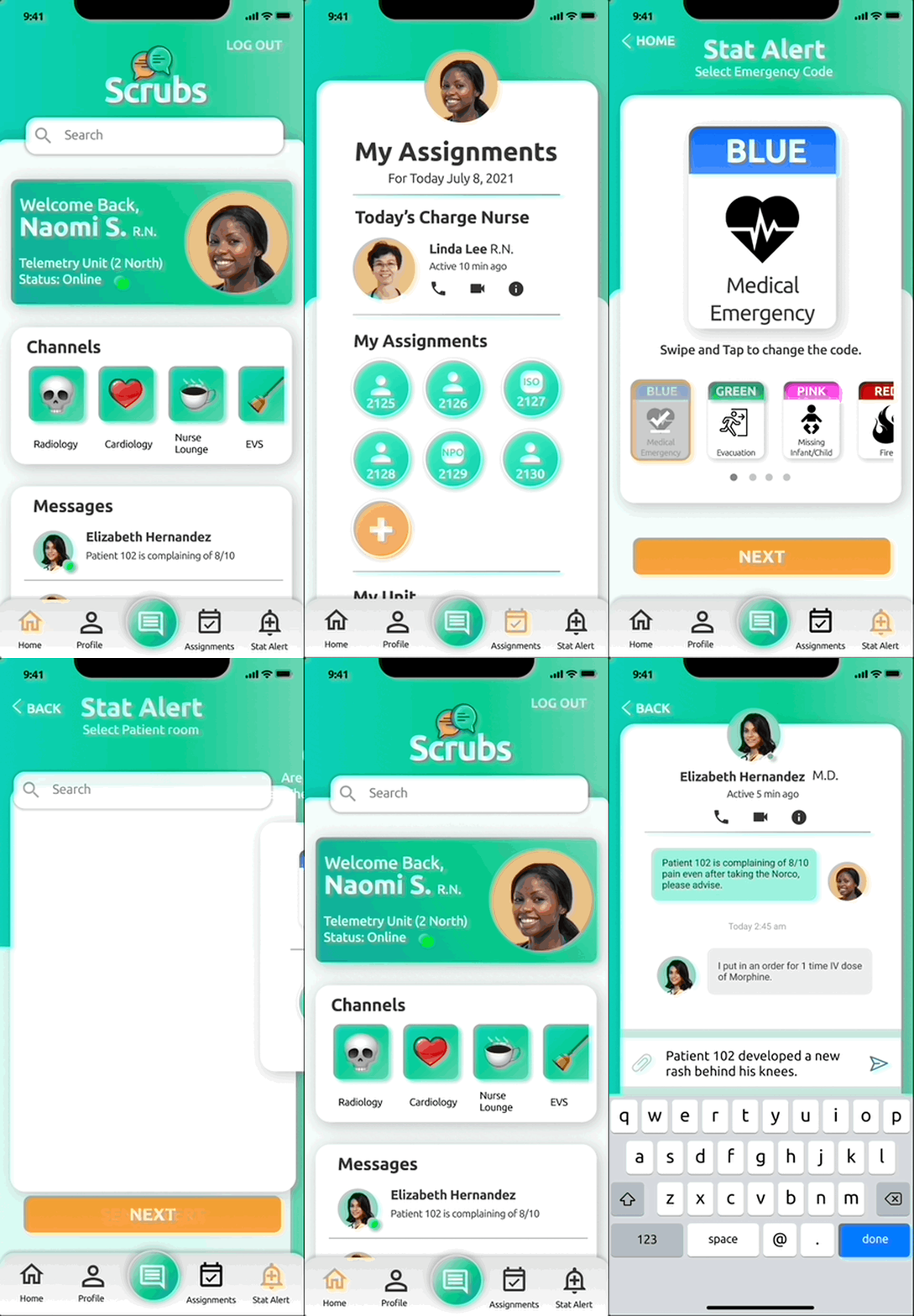
I moved the assignments to its own section and included it to the navagation.

[STAT ALERT]
[ PROBLEM ]
Users felt overwhelmed by the design and the cards were hard to read.

[ SOLUTION ]
I made "Code Blue" preselected to save time as it was the most used. I enlarged the card and placed all secondary alerts as a scrollable carousel.

[CHANNELS]
[ PROBLEM ]
Users kept thinking this was like "Instagram Stories" to post photos.

[ SOLUTION ]
I changed the shape from circle to a square with an emoji in the middle for visual reference.

[PATIENT BUTTON]
[ PROBLEM ]
Users were not sure what the numbers represented. Also users wanted to know if the patient was in isolation or not.

[ SOLUTION ]
I added a patient icon to the room button. I also added a ISO variation to represent to the user that the patient was in ISO status

[ DELIVER ]
[HI-FI PROTOTYPE]
A Hi-Fi prototype was created to test my ideas and validate the design. It was extremely helpful for me to test users on the tasks that I focused on to gain realistic insights, also understand what worked well and what requires further improvement.

[VALIDATE]
After two weeks of user research, analysis and design, I was able to validate the changes I had made. I did this by testing my clickable prototype with 5 new users. The results are:

[FINAL THOUGHTS]
With More Time, my future plans include:


-
The ability to send different kinds of messages based on urgency
-
Focusing on the flow from doctors views and pain points.
-
Researching further into adding security features into the app.
-
Building out an admin/charge nurse side of the app.
Like what you see? Contact Me.
